Volumes, Clouds & Smoke
The volume material turns a closed mesh into a participating medium: light entering it is scattered inside by a heterogeneous density field instead of bouncing off a surface. It renders cumulus clouds, smoke and fog, either shaped by procedural noise around a mesh or by a density grid converted from OpenVDB. Both GPU back-ends support it; the OptiX renderer is the one used for development.
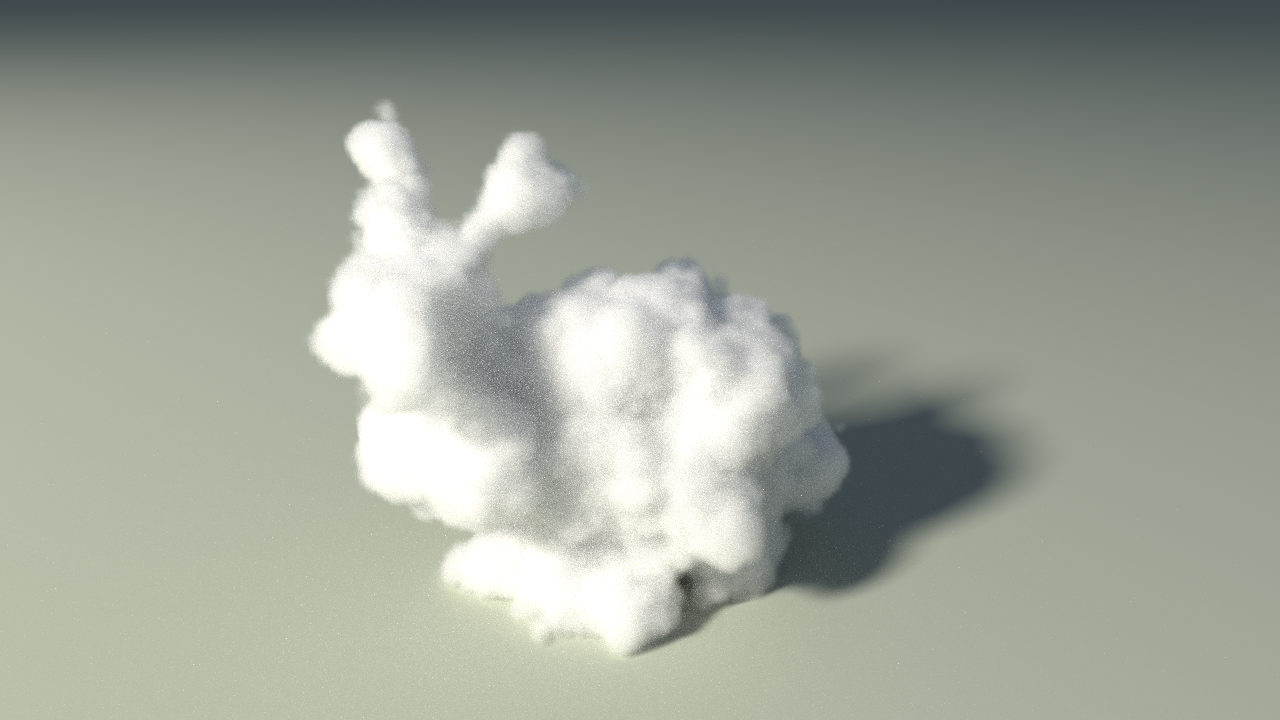
17_cloud_bunny.yaml: the bunny mesh, displaced by Worley and fractal noise, lit by a hidden sun. OptiX, 512 spp, 720p, 11 s.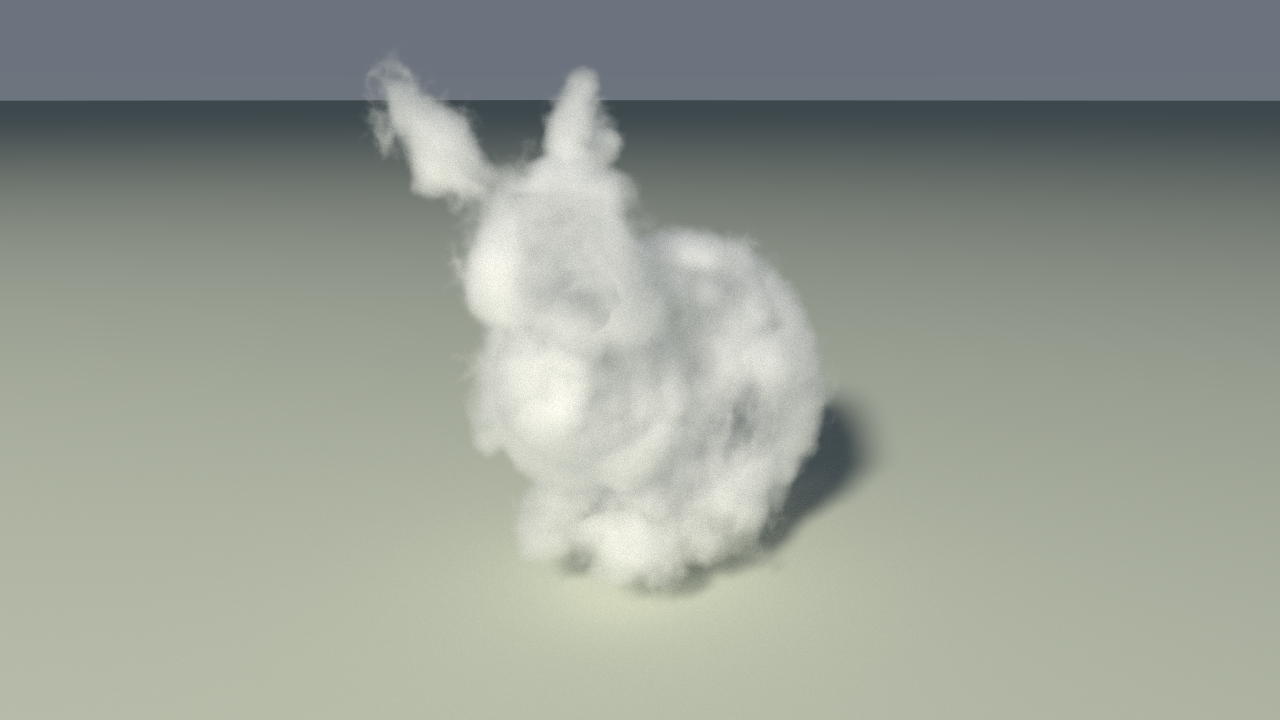
17_vdb_bunny.yaml: OpenVDB's bunny_cloud.vdb, the model behind the pbrt book's cloud image. OptiX, 512 spp, 720p, 40 s.Scene setup
materials:
  - name: "cloud"
    type: "volume"                 # aliases: smoke, cloud
    albedo: [0.99, 0.99, 0.99]     # single-scattering albedo: white cloud; lower = dark smoke
    density: 30.0                  # extinction per scene unit (mean free path = 1 / density)
    g: 0.5                         # Henyey-Greenstein asymmetry: 0 isotropic, > 0 forward
    noise_scale: 1.2               # frequency of the shape and interior noise
    noise_strength: 0.2            # interior modulation: 0 homogeneous, 1 full contrast
    edge: 0.05                     # depth over which the density ramps up at the surface
    lumps: 0.3                     # the noise displaces the surface by ± this many units
    billow: 0.85                   # share of inverted Worley noise: cauliflower lumps vs wisps

geometry:
  - type: "obj"                    # the mesh is only the boundary
    material: "cloud"
    file: "../models/bunny-3.obj"
    position: [0.34, -2.2, 0.02]
    scale: [2, 2, 2]
| Field | Default | Description |
|---|---|---|
albedo | [0.7, 0.7, 0.7] | Fraction of the light scattered (vs absorbed) at each event |
density | 2.0 | Extinction coefficient per scene unit |
g | 0.0 | Phase function asymmetry; 0.3–0.7 gives the silver lining of a backlit cloud |
noise_scale | 2.0 | Features of about 1 / noise_scale units |
noise_strength | 0.3 | Interior density noise; above 1 tears holes |
edge | 0.1 | Soft edge depth; 0 = hard edge and no distance grid |
lumps | 0.3 | Surface displacement amplitude, up to 0.75 |
billow | 0.7 | 0 fractal wisps, 1 rounded lumps |
All of these are live in the GUI (Cloud / Smoke section): a change re-bakes the density field in a few milliseconds and restarts the accumulation.
Looks to try
density: 4 for a thin veil, 25 for a dense cloud; edge: 0 for a hard-edged fog bunny; lumps: 0.6 and billow: 1 for a torn cauliflower; g: 0.6 for a brighter rim when the sun is behind the cloud.
How it works
Shape. At load, a signed distance grid of the mesh is built on the GPU (64 cells along the longest side, brute force against every triangle). The distance tells how deep a point is inside the mesh; the surface is displaced by ±lumps along a mix of fractal and inverted Worley noise, and the density ramps up over edge units from that displaced surface. Inside, fractal noise modulates the density by noise_strength. The whole field, shape times interior, is baked into a 3D texture of 160 cells along the longest side, so the tracking loops pay one texture fetch per step instead of evaluating the noise.
Transport. The medium is traversed by delta tracking: free flights are drawn against a global majorant, each tentative collision is a real scattering event with probability density / majorant and a null collision otherwise. At a scattering event the new direction comes from the Henyey–Greenstein phase function, and a volumetric shadow ray is traced towards a light with the transmittance estimated by ratio tracking. The shadow-ray and phase-sampled contributions are combined with multiple importance sampling, exactly as for surfaces. The distance grid also gives empty-space skipping: outside the mesh, beyond the reach of the lumps, a step can jump the whole distance to the surface.
Boundary. The OptiX renderer does not trace the mesh at all: it traces a box padded by 0.75 units around it, so the lumps can bulge outside the surface. The CUDA renderer keeps the mesh as the boundary, so its lumps only carve inwards.
The complete write-up, with the design decisions and the mistakes made along the way, is in explanations/VOLUMETRIC_CLOUDS.md (in French).
Density from data: OpenVDB and Blender
Instead of a mesh and noise, the material can read a dense density grid. The grid holds the whole shape; the renderer samples it straight from the 3D texture, so the light transport is unchanged. No OpenVDB dependency is needed on the C++ side: a small Python tool converts the .vdb once.
sudo apt install python3-openvdb          # OpenVDB Python bindings (Ubuntu / Debian)
curl -L -o /tmp/bunny_cloud.vdb \
  https://media.githubusercontent.com/media/AcademySoftwareFoundation/openvdb-website/master/download/models/bunny_cloud.vdb
python3 tools/vdb_to_volume.py /tmp/bunny_cloud.vdb resources/volumes/bunny_cloud.vol --cells 300
./build/rayon -m 5 --scene resources/scenes/17_vdb_bunny.yaml
bunny_cloud.vdb is 577×572×438 voxels of 0.08 units; --cells 300 box-filters it by 2 to 289×286×219 cells, 72 MB as float32. The .vol files are large and git-ignored, so each clone regenerates them (see resources/volumes/README.md).
materials:
  - name: "cloud"
    type: "volume"
    grid: "../volumes/bunny_cloud.vol"   # dense grid, path relative to the scene file
    grid_scale: 0.0656                   # scene units per grid unit: 45.8 units tall -> 3.0
    grid_position: [0.06, -1.25, -0.06]  # offset of the scaled grid
    albedo: [0.99, 0.99, 0.99]
    density: 60.0                        # extinction per scene unit where the grid reads 1
    g: -0.3
The material then needs no geometry: the loader adds the grid's bounding box as the medium boundary. The grid is normalised to [0, 1], density scales it back; edge, lumps and billow are ignored and noise_strength defaults to 0, so the GUI's noise sliders have no effect on a grid. There is no empty-space skipping for grids yet, so they render slower than the procedural volume at the same density (40 s against 11 s for 512 spp at 720p on the bunny).
Blender smoke
Any Blender smoke simulation exports to OpenVDB and goes through the same tool:
- Select a mesh, Object > Quick Effects > Quick Smoke.
- On the domain: Resolution Divisions 128–256, Noise on (Upres 2). To keep the shape of the mesh, set Gas > Buoyancy Density and Heat to 0, Vorticity to 0 and the flow Behavior to Geometry.
- Cache: Type All, Volumes Format OpenVDB, Bake. The cache holds
data/fluid_data_XXXX.vdbwith the gridsdensity,temperatureandflame. python3 tools/vdb_to_volume.py fluid_data_0015.vdb resources/volumes/smoke.vol --grid density
Without a simulation, a fog volume of any mesh can be made with OpenVDB's vdb_tool (-read bunny.obj -mesh2ls voxel=0.005 -ls2fog -write bunny_fog.vdb), which is how the sample bunny was produced.
Known limits
- The baked procedural field is 160 cells over about 8.5 units: at very high sample counts (around 2000 spp) the voxels of the field show at the cloud's edge.
- One global majorant: thin regions pay many null collisions, and grids have no empty-space skipping. A coarse grid of local majorants is the planned fix.
- No emissive media (fire), no coloured extinction, no animation. Reading NanoVDB grids directly on the GPU, and the majorant grid, are the subject of a student project described in the write-up above.